Meta · Facebook Parental Supervision · 2023–2024 Xbox Rewards & Extension: Bringing Gaming Into Every Tab
The tension
You finish a gaming session on your Xbox. You earned points, completed quests, maybe unlocked a badge. Then you open your laptop to browse the web — and all of that momentum disappears. Your browser has no idea you're a gamer. Your new tab page shows a generic landscape and a news feed you didn't ask for. The gaming identity you spent hours building stays locked inside the console.
Xbox had a loyalty problem hiding inside an engagement problem. Microsoft Rewards already existed as a points system, but on Xbox it felt disconnected — a transactional sidebar to the actual gaming experience. Meanwhile, millions of gamers were spending hours in browsers every day with no bridge between their gaming life and their browsing life. Two massive audiences, two separate products, no connective tissue.
The question wasn't "how do we get gamers to earn more points." It was: how do we make being an Xbox fan feel like something that follows you everywhere?
My role
I established the design principles that shaped the product, navigated the tension between parental control and teen autonomy, and iterated through multiple rounds of concept testing that directly informed what shipped — and what we deliberately chose not to build.
Beginning in May 2024, this work evolved into Family Center, Metas unified supervision hub across Facebook, Instagram, Messenger, and Meta Quest.
As Product Designer, I owned the end-to-end experience design for two connected workstreams: Xbox Rewards — the gamified loyalty experience across console, web, and mobile — and the Xbox New Tab Extension for Microsoft Edge and Chrome. I drove the interaction design, visual design, and content strategy for both products.
The insight: the browser is unclaimed territory for fandom
Gamers don't stop being gamers when they close the console. They check streams, read news, follow esports, browse game art. But all of that happens in scattered tabs across YouTube, Twitch, Reddit, and Twitter. The browser's new tab page — the single most-visited "page" in any browser — was wasted real estate: a blank canvas that reset to generic every time.
The insight was that the new tab page could become a personalized gaming homescreen — a place where your favorite game's art, live streams, news, events, and community links lived in one glance. Not an app. Not a website. Just the thing you see every time you open a tab, passively reinforcing your connection to the games you love.
Phase I: the Xbox New Tab Extension
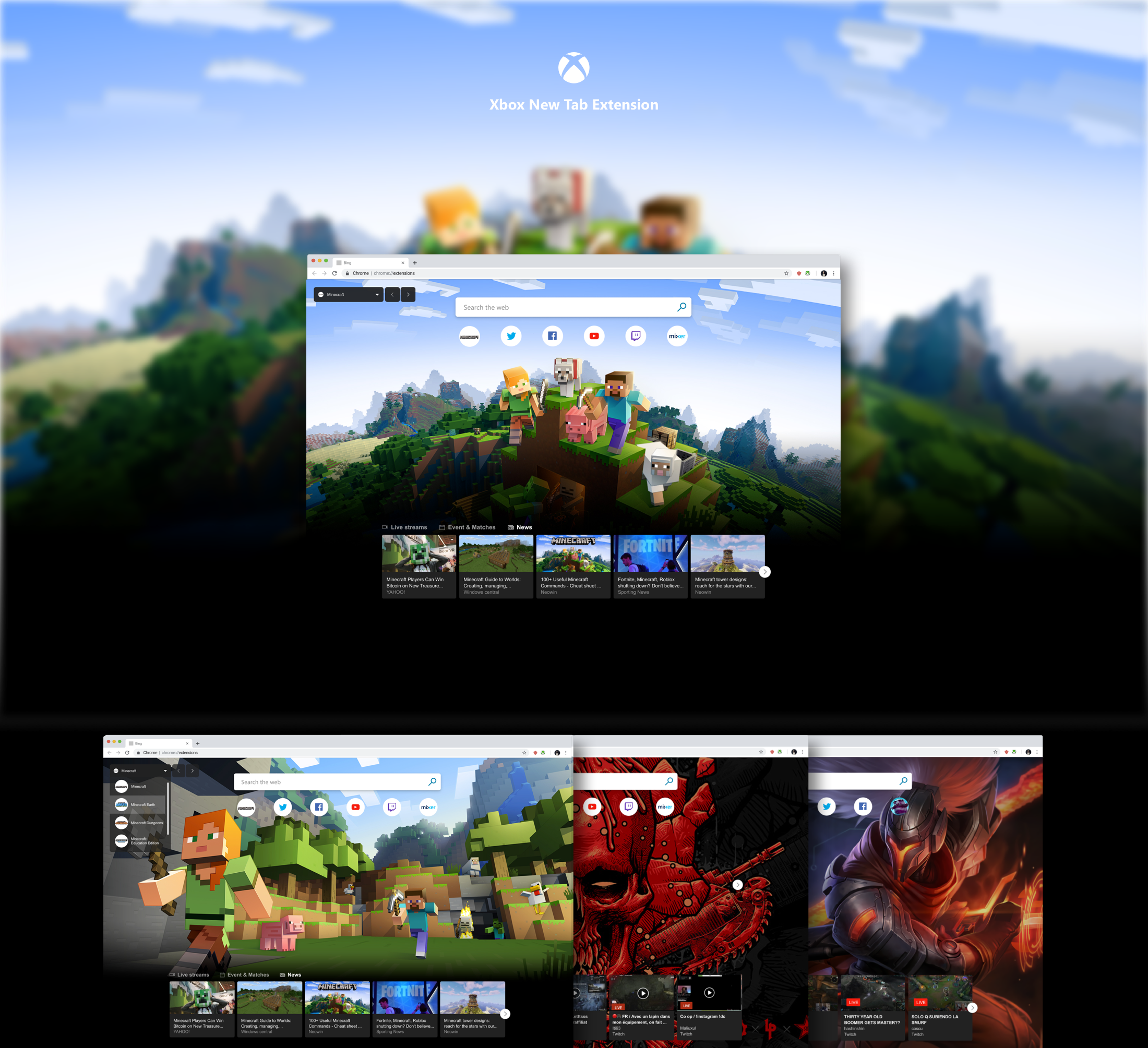
The extension replaced Edge's default new tab page with an immersive, game-themed experience. Each element was designed to serve a different facet of fandom:
Exclusive HD game art — Full-bleed backgrounds from titles like Gears 5, Forza Horizon 4, Sea of Thieves, Age of Empires 2, Ori, and Outer Worlds. Configurable from a theme selector that let users pick their game and step through multiple backgrounds per title.
Live streams — Thumbnails of active Twitch and Mixer streams for the selected game, updating in real time. One click to dive into live content.
Game-specific content links — Shortcuts to the official game site, Twitter, Facebook, YouTube, Twitch, and Mixer channels. Every link curated per game, not generic.
Exclusive events and matches — Esports tournaments, featured matches, and game events surfaced directly in the tab. Full schedules and standings without leaving the browser.
News from Bing — Game-specific news pulled from Bing's SERP, keeping the content fresh and contextual.
Theme selection — A character-level picker that let users choose not just a game but specific characters or scenes within that game.
The result
The extension launched on both Chrome and Edge. Within two weeks — with zero promotion — it hit:
10,000+ installs on Chrome
Rank #2 on the "Xbox" search query in the Chrome Web Store
PCWorld wrote: "Microsoft has published a new Xbox extension for Microsoft Edge that blurs the lines between working from home and sneaking a peek into your favorite game streams. And hey, who says your web browser can't have a little fun?"
The organic adoption validated the core insight: gamers wanted their browser to feel like theirs. They didn't need to be told about the extension — they were already searching for exactly this.
Phase II: scaling the engagement model
The Xbox extension proved something bigger than gaming: any passion-driven audience would respond to a new tab experience built around their interest. The engagement model — immersive backgrounds, curated content links, live content, and contextual news — was content-agnostic. The framework was the product; the content was the variable.
Working closely with Microsoft Marketing, I scaled the model to high-demand topics:
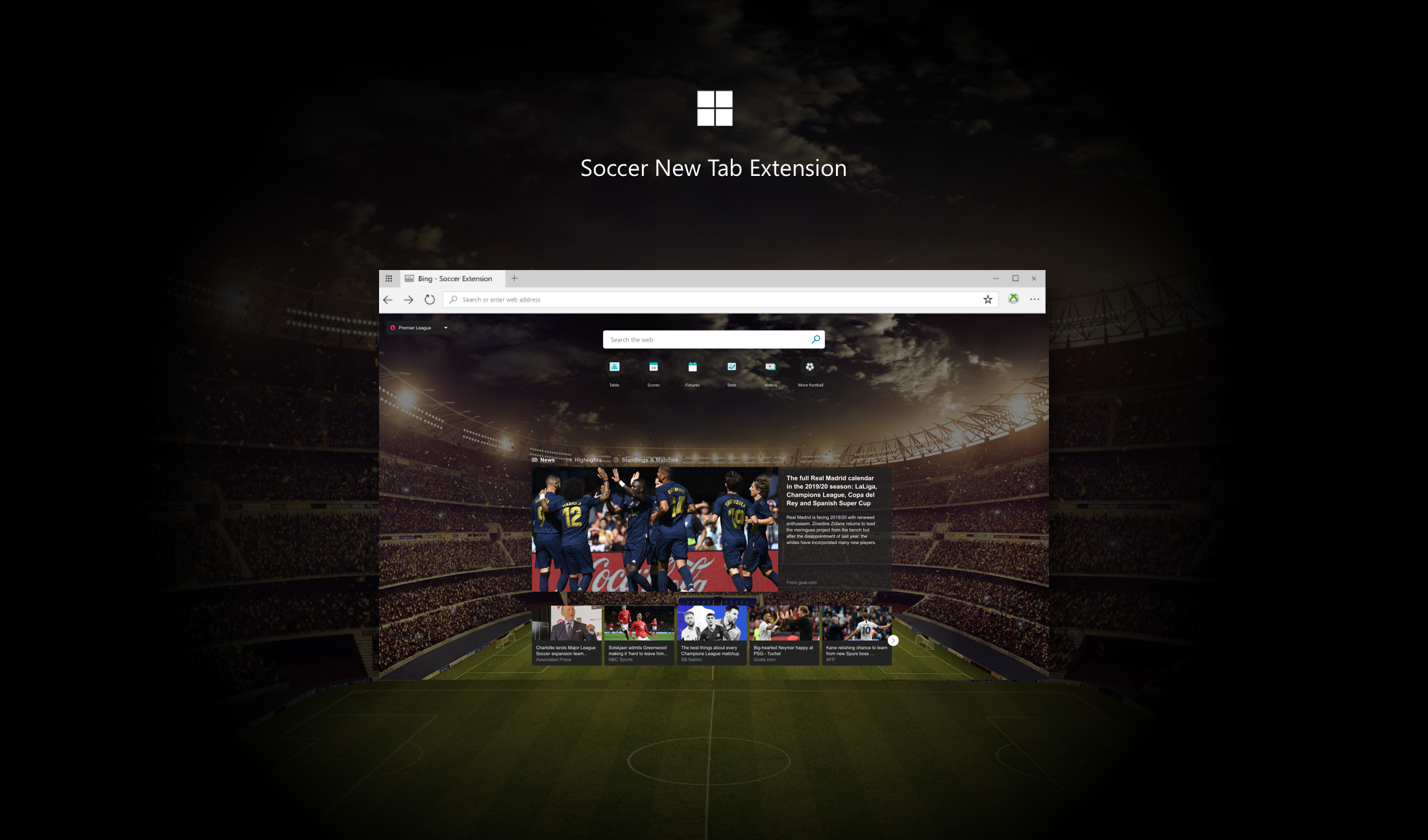
Soccer Extension — Stadium backgrounds, live match updates from MSN, standings and schedules, personalized league and tournament selection. News, Highlights, and Matches & Standings tabs adapted the gaming content model to sports.
Frontpage (Wallpaper) Extension — Curated photography and art for users who wanted beauty without the gaming or sports context.
DC Characters Extension — Comic art and entertainment content for the superhero fandom.
Do Good Extension — Social impact content aligned with Microsoft's corporate social responsibility initiatives.
Each extension reused the same architectural framework — background art system, content link bar, live content feed, theme selector — while completely transforming the visual and content identity. One system, many audiences.
Xbox Rewards: gamifying loyalty across screens
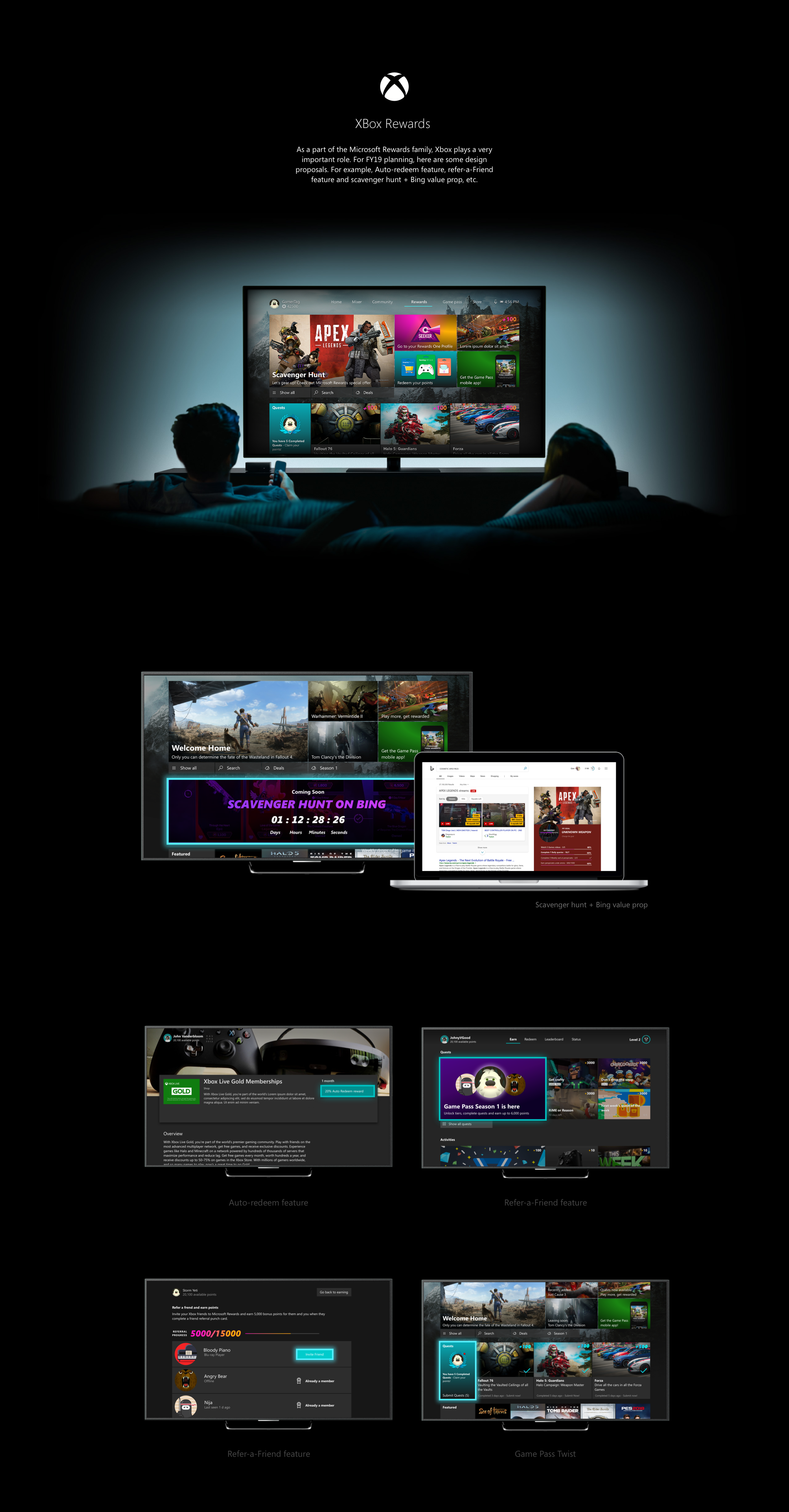
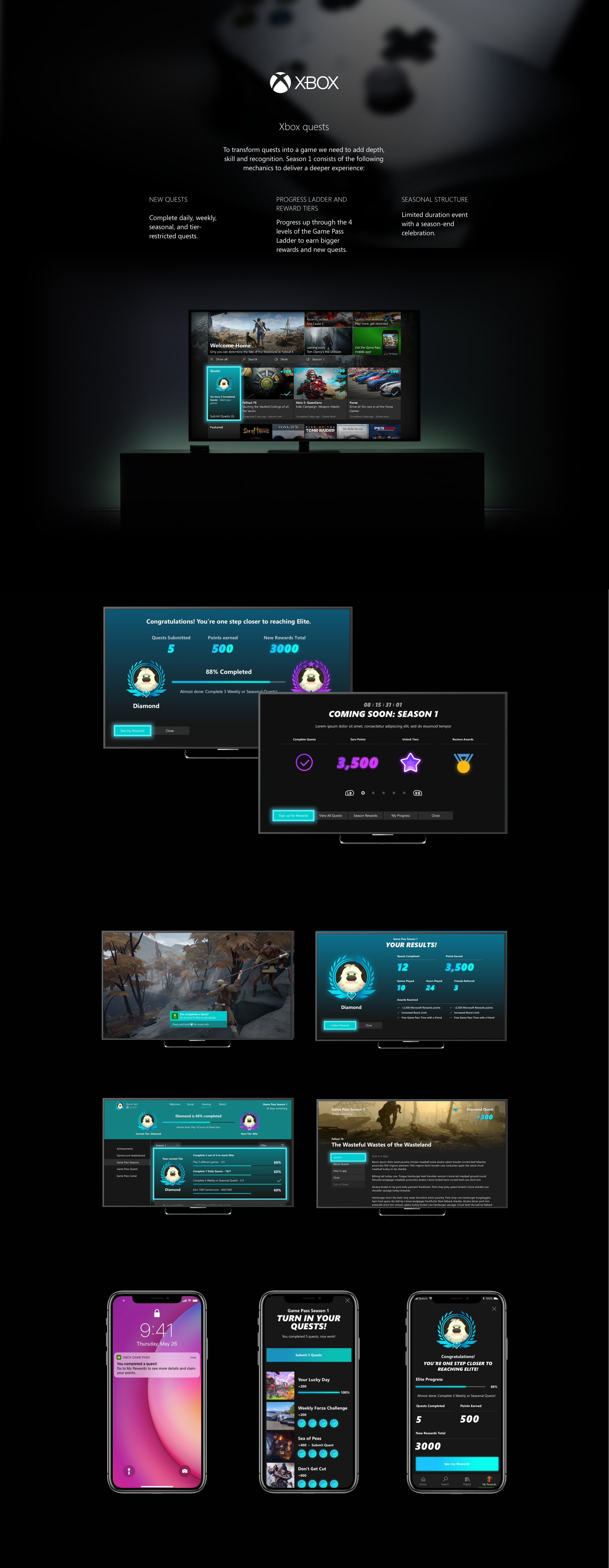
Parallel to the extension work, I designed the Xbox Rewards experience — Microsoft Rewards reimagined for gamers. The challenge was making a points program feel like part of the gaming experience rather than a corporate loyalty scheme bolted onto the side.
The design centered on three principles:
Quest-based structure — Instead of generic "earn points for searching," rewards were framed as Daily, Weekly, and Monthly quests with clear objectives and progress indicators. The language and cadence borrowed from in-game achievement systems that gamers already understood.
Seasonal campaigns — "Coming Soon: Season 1" introduced a seasonal model familiar from live-service games. Limited-time events like the Scavenger Hunt on Bing created urgency and cross-platform engagement — gamers had to use both Xbox and Bing to complete challenges.
Cross-platform continuity — The same Rewards identity carried across Xbox console, web browser, and mobile app. Your points, quests, and progress followed you everywhere. The visual design — dark backgrounds, teal accents, achievement badges — stayed consistent across screens while adapting to each platform's interaction patterns.
Reflection
This project taught me that the most powerful engagement tools don't feel like engagement tools at all. The Xbox New Tab Extension didn't ask users to do anything — it just made every new tab feel like theirs. That quiet sense of ownership drove more installs in two weeks than a marketing campaign could have.
The hardest part was convincing stakeholders that a new tab page was worth investing in. It's not a product in the traditional sense — there's no signup flow, no onboarding, no conversion funnel. But that's exactly what made it work. The lowest-friction surface in the browser became the highest-engagement one, precisely because it asked nothing of the user except to open a tab they were going to open anyway.
What I'm most proud of is the scalability proof. The jump from Xbox to Soccer to DC Characters wasn't a pivot — it was the plan. Designing the extension as a framework first and a product second meant that every new topic was a content swap, not a rebuild. That's the kind of design thinking that turns one product into a platform.